Integrated vs. Dedicated Graphics: When Does the Difference Actually Matter?

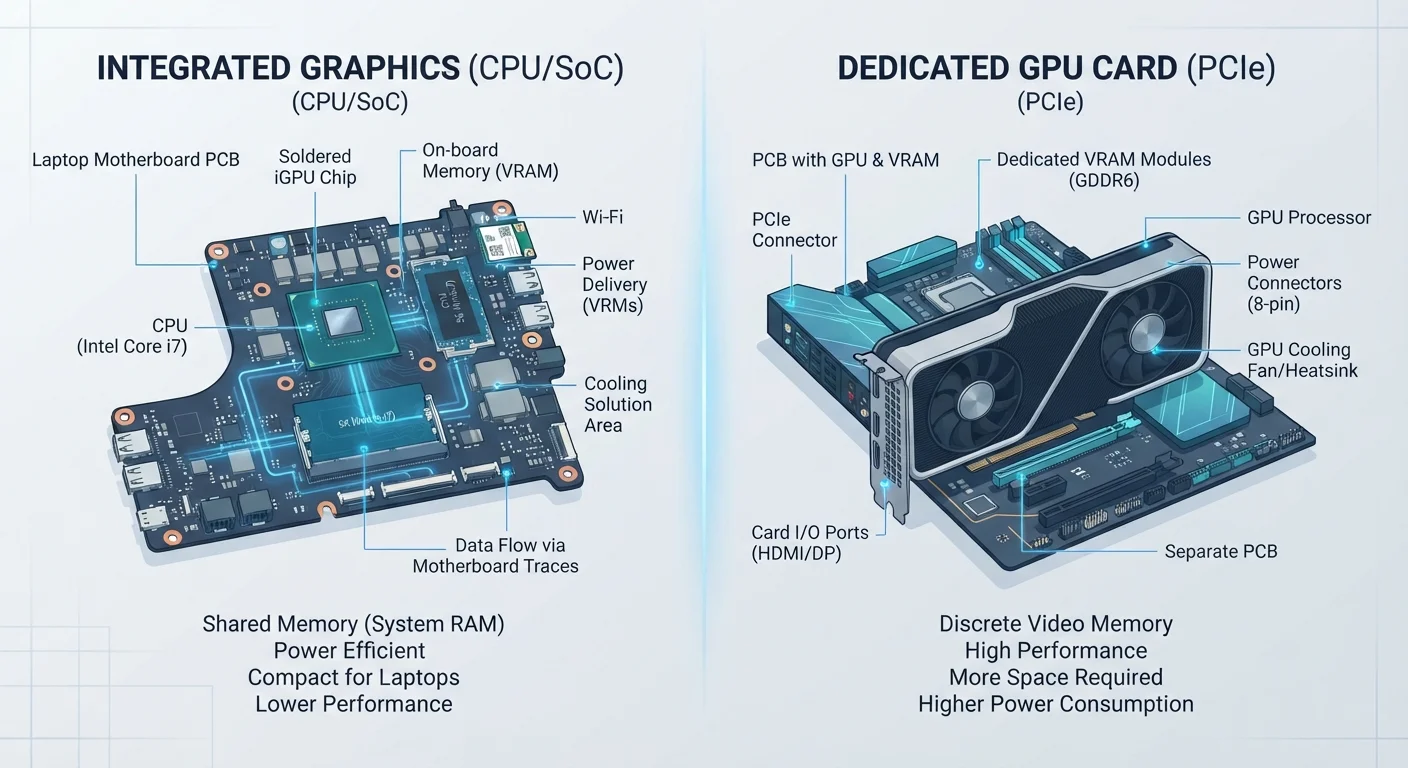
Photo: UnlockTopics.com | Unlocking Trending Content editorial
Key Takeaways
- Integrated graphics handle everyday tasks — web browsing, documents, and video streaming — without any issues.
- A dedicated GPU becomes worthwhile for gaming, video editing, 3D rendering, or machine learning workloads.
- Dedicated GPUs consume more power and generate more heat, which matters especially in laptops.
- Many modern integrated graphics solutions have improved significantly and can handle light gaming and creative work.
- Choosing a GPU comes down to your actual workload, not just the idea of having more performance.
What Graphics Processing Actually Does
Every image you see on a screen — a webpage, a spreadsheet, a movie — had to be calculated and rendered before it reached your eyes. That job belongs to the graphics processor, or GPU. It takes instructions from software and converts them into the pixel-by-pixel images your display shows.
Most of this work is routine and lightweight. Rendering a browser window or moving files around a desktop doesn't demand much graphical muscle. But complex tasks — drawing millions of 3D polygons per second in a game, or processing the color data in a 4K video timeline — require substantial, sustained computation.
Understanding what your GPU actually does helps put the integrated vs. dedicated debate in perspective. It's not a question of better or worse; it's a question of whether the workload justifies the hardware. See our guide to what computer specs actually mean for how the GPU fits alongside other core components.
~70%
PCs shipped with integrated graphics only
Industry analyst estimates consistently show that the majority of consumer PCs sold globally use integrated graphics, reflecting that most computing tasks do not require dedicated GPU hardware.
3–5×
Typical rendering speed advantage of dedicated GPUs
In video production workflows, dedicated GPU acceleration can reduce render and export times by a factor of three to five compared to software-only rendering on integrated graphics, according to various software benchmarking evaluations.
Integrated Graphics: Built-In and Capable Enough for Most
Integrated graphics are embedded directly into the same chip as the processor. They draw on the computer's main system RAM rather than having their own dedicated pool of memory. This design keeps costs low, reduces power draw, and generates less heat — all meaningful advantages, especially in thin laptops.
Modern integrated graphics have improved substantially. They handle video playback (including 4K in many cases), video conferencing, photo browsing, and basic image editing without complaint. For the majority of people who use a computer for work, communication, and media consumption, integrated graphics are genuinely sufficient.
The limitation shows up under sustained, complex visual workloads. When you need to render thousands of 3D objects in real time, process large video files, or train visual AI models, the shared memory and lower core count of integrated graphics becomes a bottleneck.
A Simple Test for Your Needs
Dedicated GPUs: When the Extra Hardware Earns Its Place
A dedicated GPU — sometimes called a discrete GPU — is a separate processing unit with its own memory, cooling system, and architecture optimized purely for visual and parallel computation. It doesn't compete with the CPU for system RAM, which keeps both operating more efficiently under load.
The workloads where a dedicated GPU makes a measurable difference include:
- PC gaming — especially titles with high polygon counts, complex lighting, or high frame-rate requirements
- Video editing and color grading — GPU acceleration dramatically speeds up rendering and export times
- 3D modeling and animation — viewport performance in creative software depends heavily on GPU capability
- Machine learning and AI workflows — many training tasks run on the GPU rather than the CPU
If your work or hobby falls into one of these categories, a dedicated GPU is a practical investment. If it doesn't, you're likely paying for performance you won't use. This trade-off is one reason it matters when choosing between form factors — our laptop vs. desktop comparison walks through how GPU options differ between the two.
Power, Heat, and the Laptop Consideration
Dedicated GPUs consume more power and produce more heat than integrated solutions. In a desktop, this is manageable — larger chassis, better airflow, and the ability to add cooling keep things under control. In a laptop, the trade-offs are more pronounced.
A laptop with a dedicated GPU will typically have shorter battery life, run warmer, and be heavier than a comparable model with integrated graphics only. Manufacturers manage this by using lower-power versions of discrete GPUs in laptops, which deliver less performance than their desktop counterparts but still exceed what integrated graphics can do.
If you're choosing a laptop primarily for portability and all-day battery use, integrated graphics may serve you better than a heavier machine with a GPU you rarely need. Our all-in-one vs. traditional desktop comparison covers similar trade-offs in the desktop space.
“The GPU market has bifurcated clearly: integrated solutions have closed the gap for general computing, while discrete GPUs continue to pull ahead for workloads that demand sustained parallel processing. Knowing which camp your work falls into is the whole decision.”
— Jon Peddie, Technology analyst and author specializing in graphics processing
Making the Call for Your Situation
The honest answer is that most computer buyers do not need a dedicated GPU. Productivity work, media consumption, web use, and even casual creative tasks fall well within what integrated graphics handle comfortably. Paying extra for a discrete GPU in this scenario adds cost without delivering visible benefit.
Where dedicated graphics make clear sense: you play graphically demanding games, you work with video or 3D professionally or seriously as a hobby, or you run software that explicitly benefits from GPU acceleration. In those cases, the performance difference is real and the investment reflects your actual use.
Before assuming you need a dedicated GPU, it's worth auditing what you actually do on a computer day-to-day. Upgrading storage or RAM may produce a more noticeable improvement for general use. The relationship between RAM and overall performance is one example of how spec choices interact in ways that aren't always obvious.
External GPUs: A Niche Option
Frequently Asked Questions
The content on this site is for informational purposes only and is not a substitute for professional advice. Always consult a qualified professional for guidance specific to your situation.